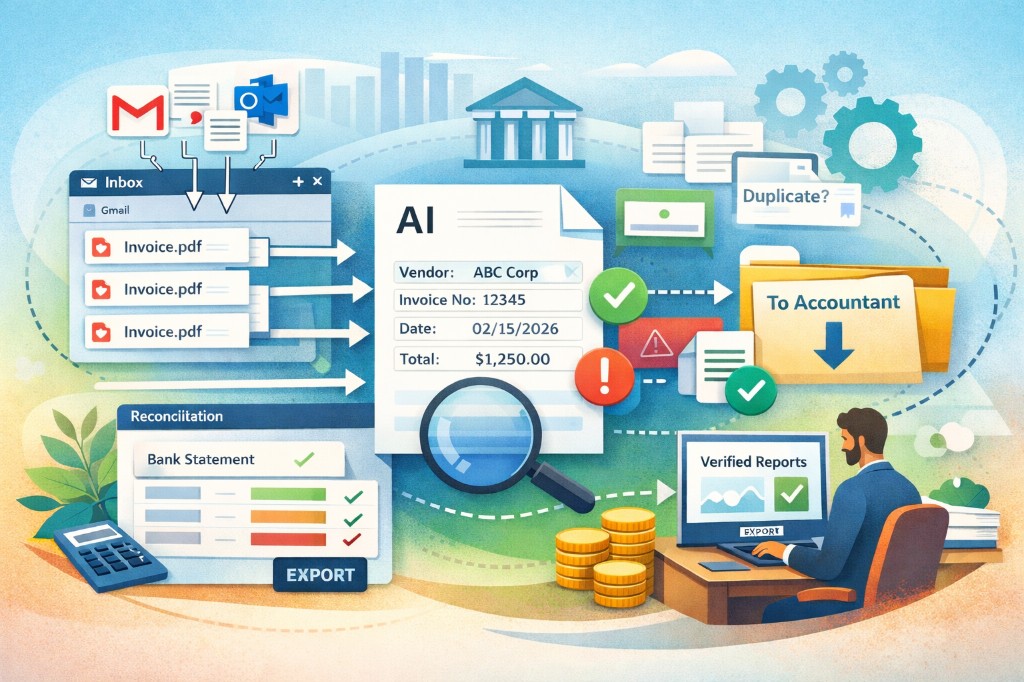
Clerko is built for the part of accounting that gets messy before the books are even touched: finding invoices, collecting receipts, extracting the right fields, matching payments, and sending clean records to your accountant.
Instead of chasing documents across inboxes, folders, chat apps, and bank statements, Clerko gives you one workflow:
- collect invoices and receipts from the places they already arrive
- extract vendor, dates, totals, VAT, currency, and other key fields
- flag unclear documents, duplicates, and missing information for review
- reconcile bank statement transactions against invoices
- share clean, organized records with your accountant
It is not a replacement for your accountant. Clerko helps you prepare the inputs so bookkeeping, reconciliation, and month-end close start from cleaner data.
What Clerko Does
1. Collect invoices and receipts from every common source
Documents rarely arrive in one tidy place. Some come by email. Some are downloaded from portals. Some are screenshots or paper receipts. Some are sent in chat.
Clerko supports the main ways small businesses and teams collect financial documents:
- Gmail and Outlook inbox scanning
- direct PDF and image uploads
- Google Drive and OneDrive folders
- Telegram bots
- WhatsApp bots
- receipt photos and scanned documents
That means invoices and receipts can land in one Clerko workspace instead of being scattered across email threads, downloads folders, and message history.
2. Scan past periods when something is missing
If you are onboarding, closing a month, or cleaning up a backlog, you can scan a specific date range instead of only watching for new mail.
This is useful when:
- a vendor says they already sent the invoice
- a client needs a clean handoff to an accountant
- you are missing documents before reconciliation
- you want to catch invoices buried in old reply chains
- you need to prepare a previous month or quarter
The goal is simple: find the documents before they become month-end surprises.
3. Extract invoice and receipt data with AI
Once a document is imported, Clerko extracts the fields you actually need for review, reconciliation, and accountant handoff.
Common extracted fields include:
- vendor and buyer names
- invoice or receipt number
- issue date and due date
- currency
- subtotal, tax, and total
- VAT or tax details when present
- line items and service periods when available
- payment terms and bank details when visible
For receipts, Clerko focuses on the practical fields you need for expenses: merchant, date, amount, tax, and clean structured data for review or export.
4. Keep review in the loop
Automation is useful only when it does not silently create new mistakes. Clerko is designed around a review-first workflow.
Clear documents can move quickly. Unclear documents are flagged instead of being guessed.
Clerko can surface:
- low-confidence fields
- missing totals or dates
- suspicious tax or total values
- duplicate invoices
- documents that need a human decision
You review exceptions, not every single field from scratch.
5. Reconcile bank statements against invoices
Clerko also helps with the next question after collection and extraction: has this invoice actually been paid?
Upload a CSV, Excel, or PDF bank statement for the period you are closing. Clerko parses the statement and helps match outgoing payments to invoices.
This helps you see:
- which invoices are matched to payments
- which payments are missing invoices
- which invoices still need follow-up
- which matches need confirmation
- where the close is blocked
Reconciliation stays under your control. Clerko suggests likely matches and highlights gaps so you can confirm the final picture.
6. Share clean records with your accountant
When the documents, extracted fields, and payment status are organized, the accountant handoff becomes much easier.
Instead of sending a pile of PDFs and follow-up notes, you can share a cleaner set of records with context:
- original invoice or receipt files
- extracted fields
- review status
- duplicate or exception notes
- reconciliation status
- matched transaction context
That gives your accountant better inputs and gives you fewer back-and-forth questions.
How the Clerko Workflow Looks in Practice
Here is a typical flow for a small business preparing for close:
- Connect your sources: Gmail, Outlook, Drive folders, uploads, Telegram, or WhatsApp.
- Run a scan for the period you want to prepare.
- Let Clerko extract invoice and receipt data from PDFs and photos.
- Review only the documents and fields that need attention.
- Upload a bank statement and match payments to invoices.
- Share clean records with your accountant.
The result is less chasing, less manual typing, fewer missing documents, and a faster close.
Who Clerko Is For
Clerko is useful for anyone who needs business documents organized before bookkeeping or tax work starts.
It is especially helpful for:
- solopreneurs and freelancers who need receipt and expense tracking without admin work
- small business owners who want invoices and receipts in one place
- operators who collect documents for an accountant
- finance teams that close monthly periods
- accountants and bookkeepers who want cleaner client inputs
- teams that receive invoices across email, chat, uploads, and cloud folders
If you have ever searched your inbox for “invoice”, asked someone to resend a receipt, or checked bank payments against PDFs by hand, Clerko is built for that workflow.
What Clerko Is Not
Clerko does not replace your accountant, make final tax decisions, or auto-approve every ambiguous document.
It automates the repetitive work around collection, extraction, organization, and reconciliation. Final review and accounting judgment stay with you and your accountant.
That is intentional. The product is built to make the process faster without hiding uncertainty.
FAQ
What sources can I connect?
You can connect Gmail and Outlook inboxes, upload files directly, use Google Drive or OneDrive folders, and send invoices or receipts through Telegram or WhatsApp bots.
Can Clerko find old invoices?
Yes. You can scan a custom date range, which is useful when onboarding, closing a past period, or looking for invoices that vendors already sent.
Does Clerko work with receipts too?
Yes. Clerko can process receipt photos and common image formats, including receipts sent through Telegram or WhatsApp bots.
What fields does Clerko extract?
Clerko extracts practical accounting fields such as vendor, invoice number, dates, currency, subtotal, tax, total, VAT details, and line items when available. For receipts, it focuses on merchant, date, amount, tax, and expense-ready data.
How does reconciliation work?
You upload a bank statement for the period. Clerko parses transactions and helps match payments to invoices so you can see what is paid, what is missing, and what needs review.
Is Clerko fully automated?
No, and that is by design. Clerko automates the repetitive parts, but unclear fields, possible duplicates, and ambiguous payment matches are surfaced for review.
Is Clerko a replacement for my accountant?
No. Clerko prepares cleaner records for your accountant. Your accountant remains responsible for final bookkeeping, tax treatment, and professional judgment.
What is the fastest way to try it?
Connect an inbox, upload a few invoices or receipts, or send a receipt photo through a Telegram or WhatsApp bot. You can see how Clerko collects documents, extracts fields, and prepares them for review from the first batch.
The Bottom Line
Clerko helps you move from scattered documents to clean records.
It collects invoices and receipts, extracts the data, flags what needs review, reconciles payments, and prepares a better handoff for your accountant. If your current process depends on inbox searches, manual downloads, spreadsheets, and last-minute questions, Clerko gives you a simpler way to get ready for close.