
If you need to know how to get Delta receipt copies quickly, start with Delta’s own tools: use My Trips for a recent flight, use My Receipts after signing in for older receipts, and email [email protected] when the receipt is no longer available online or you do not have a Delta login. For expense reports, reimbursements, tax records, or a refund follow-up, save the actual ticket, baggage, or refund receipt instead of relying only on an itinerary screenshot.
The fastest way to get a Delta receipt
For a recent Delta trip:
- Go to
Delta My Trips. - Enter the passenger’s first name, last name, and confirmation number.
- Open the trip details.
- Scroll to
Payment Details. - Choose the receipt or
Email Receiptoption if it is available. - Send the receipt to your email, then save it as a PDF if you need to upload it somewhere.
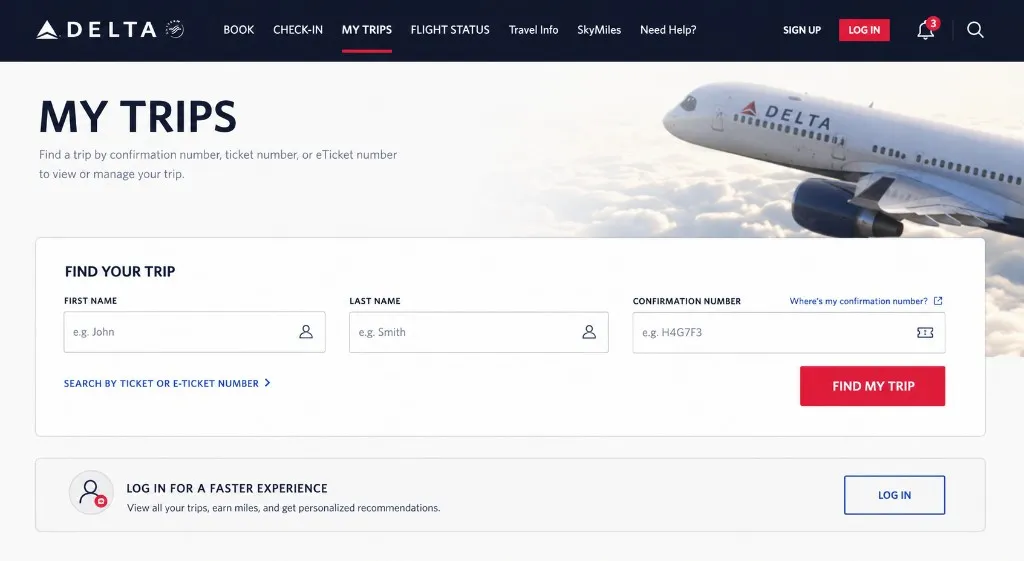
That is the shortest path when the trip is still easy to find. The rest of this guide covers older trips, SkyMiles or delta.com account receipts, app paths, email recovery, baggage receipts, refunds, and cases where Delta cannot find the reservation.
Delta receipt vs itinerary vs boarding pass
People often search for a Delta receipt when they are looking at a different travel document.
- Receipt: shows payment details for a ticket, baggage fee, seat, upgrade, or other purchase.
- Itinerary: shows flight plans, airports, times, passengers, and confirmation details, but may not be enough for reimbursement.
- Boarding pass: proves check-in or boarding details, but it is usually not the accounting document you want.
- Refund documentation: shows a refund or credit transaction and may be separate from the original purchase receipt.
If an employer, accountant, card issuer, or travel policy asks for proof of purchase, look for the receipt or emailed receipt, not just the itinerary.
How to get a Delta receipt from My Trips
1. Open Delta My Trips
Go to delta.com/mytrips. Use the same passenger name that was on the ticket. If your name includes a middle name, suffix, hyphen, or different spelling, try matching the booking exactly.
2. Search with your confirmation number
Enter the confirmation number from your booking email. This is usually the six-character code people use to find a reservation.
If you booked while signed in, you can also try signing in to your Delta account first. That can make it easier to connect the trip with your account history.
3. Open the trip and check Payment Details
After the trip opens, look for a payment or receipt area. Delta’s official support page says that, for travel within 24 hours of the last flight traveled, you can scroll to Payment Details and select Email Receipt.
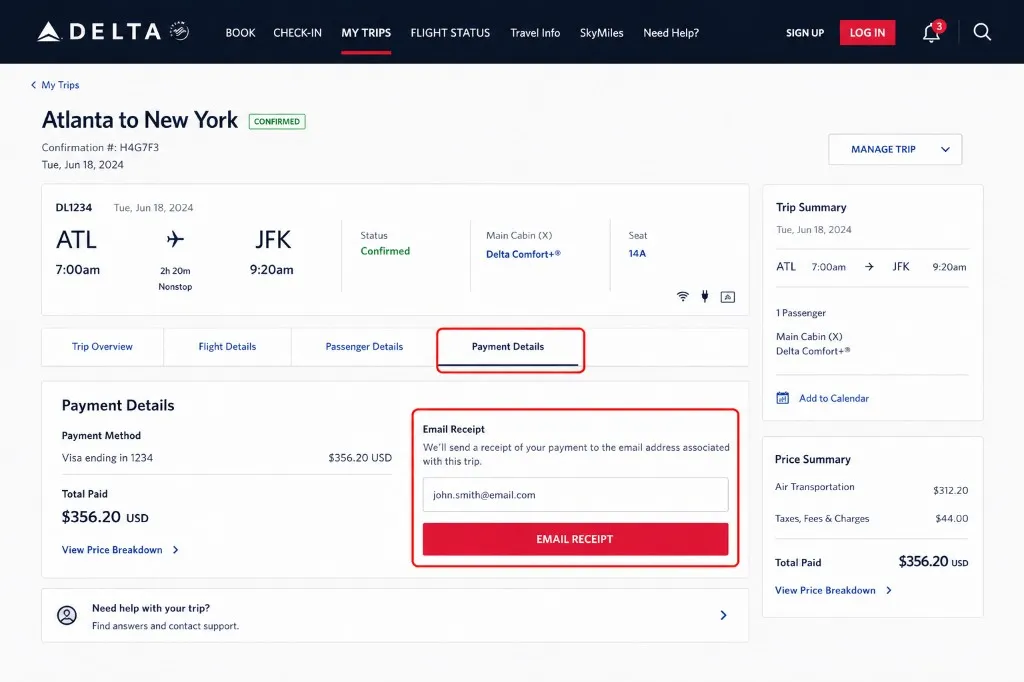
4. Email or save the receipt
Send the receipt to an email address you can access. If you need a PDF, open the email or receipt page and use your browser’s print dialog to save it.
How to get older Delta receipts from your account
If the trip is no longer in the simple My Trips path, sign in to your Delta account and look for My Receipts.
Delta says historical ticket receipts, baggage receipts, and receipts for other purchases made through delta.com from the past 24 months can be accessed through the My Receipts feature if you have a delta.com account.
A common desktop path is:
- Sign in to your Delta account.
- Open your account area.
- Look for
My Receipts. - Search or filter for the trip, baggage fee, seat, upgrade, or other purchase.
- Open the receipt and save or email it.
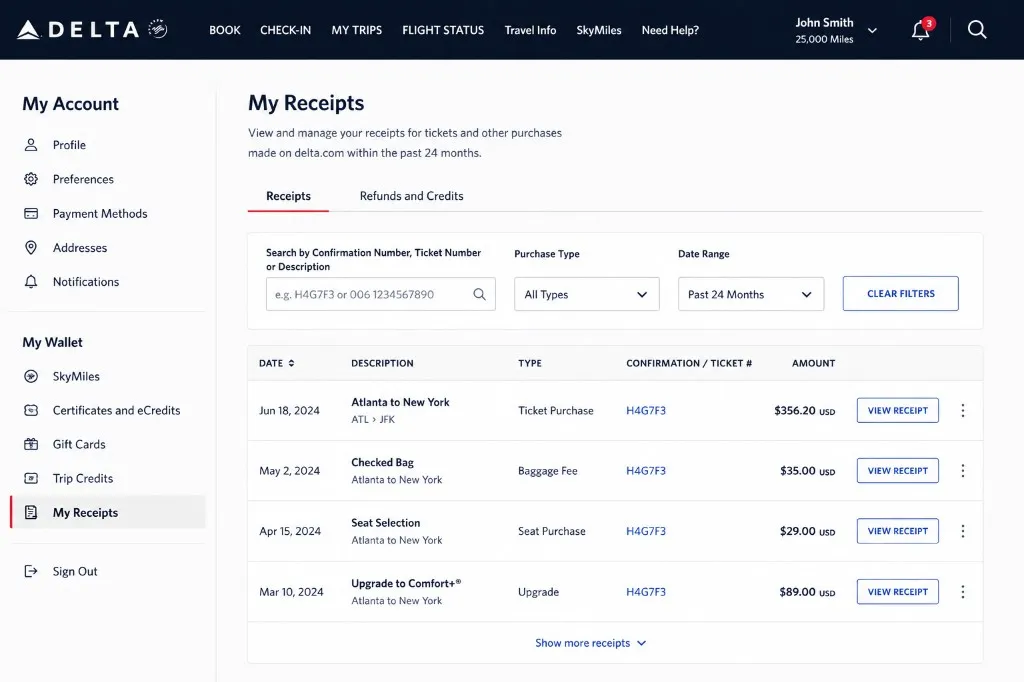
If you cannot see older receipts, check whether the purchase was made while signed in, whether you used the same account, and whether the booking came through a travel agency or third-party site.
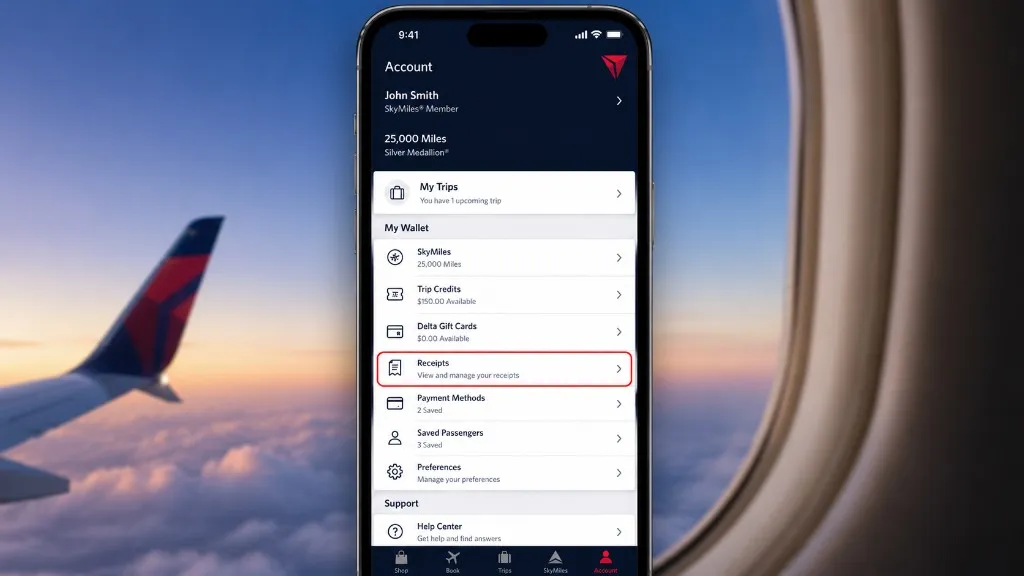
How to find Delta receipts in the app
The Delta app can be useful, but the exact labels can change by app version and account state.
Try these paths:
- Open the Delta app.
- Sign in to the Delta account connected to the trip.
- Check
Tripsfor recent travel. - Check the account or wallet area for
Receipts,My Receipts, or a similar label. - Open the matching ticket, baggage, seat, or upgrade receipt.
Some travelers report seeing receipts under an app path like Account > My Wallet > Receipts, while others see a direct Receipts option. If the app does not show the receipt, switch to desktop web and try My Receipts; it is usually easier to search and save documents from a browser.
How to get a Delta receipt from email
Your inbox is often the fastest backup.
Search your email for:
Delta receiptDelta Air LinesYour Trip Confirmation- The confirmation number
- The 13-digit ticket number if you know it
006, since Delta ticket document numbers usually begin with 006baggage receiptorseat receiptfor add-on purchases
Open the original Delta email and save the receipt attachment or linked receipt page. If you only find the itinerary, use the confirmation number or ticket number from the email to search Delta’s site.
How to request a Delta receipt by email
If the last flight was more than 24 hours ago and you do not have a delta.com login, Delta says passengers can email [email protected] to request specific ticket copies or baggage receipts.
Include:
- Passenger name
- 13-digit ticket document number, if you have it
- Type of credit card used for purchase, such as Visa, Mastercard, American Express, Discover, or cash
Do not include the full credit card number.
If you do not know the ticket number, include:
- Passenger name
- Date of travel
- Origin airport
- Type of credit card used for purchase, or cash
Delta says the request must be submitted by the ticketed passenger or the credit card holder.
Where to find the Delta ticket number
A Delta ticket number is different from a confirmation number. The confirmation number is usually a short booking code. The ticket number is a 13-digit document number.
Look for it in:
- The Delta purchase receipt email
- The e-ticket confirmation
- Your Delta account receipt history
- A travel agency or corporate booking email
- Your expense system, if the trip was booked through work
Delta notes that ticket document numbers begin with 006, and baggage receipts begin with 00682.
How to get baggage, seat, upgrade, and other Delta receipts
Ticket receipts are not the only documents travelers need. Baggage fees, paid seats, upgrades, and some other purchases may have their own receipt records.
Start with My Receipts if you have a Delta account. Search around the travel date and check whether the purchase appears separately from the flight ticket. If it does not appear, email Delta with the passenger name, ticket number or travel details, and explain that you need the baggage, seat, upgrade, or other purchase receipt.
For reimbursement, save each related receipt separately. A ticket receipt may not show a later baggage or seat purchase clearly enough for finance review.
How to get a Delta refund receipt
Refund documentation can be separate from the original ticket receipt.
Start here:
- Open the original trip in
My Tripsor your Delta account. - Look for payment, refund, or receipt details.
- Check your email for Delta refund notifications.
- Search by confirmation number and ticket number.
- If the refund receipt is not visible, contact Delta and ask for both the original purchase receipt and refund documentation.
Have the confirmation number, ticket number, passenger name, travel date, and original payment method ready. If the trip was booked through a travel agency, online travel site, or corporate travel tool, you may need to request the receipt or refund document from that seller instead of Delta.
What to do if Delta cannot find your trip
This is the frustrating case behind many receipt searches.
Try a different identifier
Search with the confirmation number first. If that fails, try signing in and searching from the account. If you have a ticket number, use it when contacting Delta.
Match the passenger name exactly
Use the name as it appeared on the ticket, not necessarily the name you use every day. Small differences can matter.
Check the booking source
If you booked through a travel agency, online travel site, company travel portal, or another airline partner, Delta may not be the place that can provide every receipt copy. Delta’s support page says reservations booked through a travel agency or online site should be handled through that agency or site for ticket copies.
Check whether the receipt belongs to a different account
If you used a work email, old personal email, family member’s account, or another SkyMiles or delta.com account, the receipt may not appear where you expect it.
Contact Delta with enough detail
When online lookup fails, send or provide the passenger name, travel date, origin airport, confirmation number if available, ticket number if available, and card type used. Do not send the actual credit card number.
Tips for accounting and reimbursement
Save the receipt as soon as you retrieve it. Name the file with the travel date, vendor, passenger, and document type, such as 2026-05-12-delta-ticket-receipt.pdf or 2026-05-12-delta-baggage-receipt.pdf.
If you collect travel receipts often, keep Delta ticket, baggage, seat, and refund documents together. For recurring finance workflows, the larger problem is usually not one missing Delta receipt; it is collecting receipts from email, portals, card feeds, and travel tools every month.
That is where Clerko’s Inbox Scanning, AI Processing, and Integrations can help once receipts start arriving from many places. You can also browse the full tutorial hub for more vendor-specific receipt walkthroughs.
FAQ
What is the fastest way to get a Delta receipt?
For recent travel, use Delta My Trips with the passenger name and confirmation number. Open the trip, go to Payment Details, and choose the receipt or Email Receipt option if it appears.
Where are older Delta receipts stored?
Delta says historical ticket, baggage, and other receipts for purchases made through delta.com from the past 24 months can be accessed through My Receipts if you have a delta.com account.
Can I get a Delta receipt with only a ticket number?
Yes, in many cases. Delta asks for the passenger name and the 13-digit ticket document number when requesting ticket copies or baggage receipts by email. Delta ticket document numbers usually begin with 006.
What if I do not know my Delta ticket number?
Delta says you can provide the passenger name, date of travel, origin airport, and the type of credit card used for purchase instead. Do not include the actual credit card number.
How do I get a Delta baggage receipt?
Check My Receipts if you have a Delta account. If it is missing, email [email protected] and specify that you need a baggage receipt. Delta notes that baggage receipt numbers begin with 00682.
Why does Delta say it cannot find my reservation?
Common reasons include the wrong name format, an old trip, a booking tied to another account, a third-party booking, or a receipt that is no longer available through the simple My Trips lookup. Try signing in, checking My Receipts, searching email, and contacting Delta with the ticket number or travel details.
Can I get a Delta receipt if I booked through a travel agency?
Maybe, but Delta says reservations booked through a travel agency or online site should be handled through that agency or site for ticket copies. Start with the seller that charged you, especially if Delta’s tools cannot find the booking.
How do I get a Delta refund receipt?
Check the original trip, your Delta account, and your email for refund documentation. If it is not visible, contact Delta with the confirmation number or ticket number and ask for both the original purchase receipt and the refund receipt or refund confirmation.